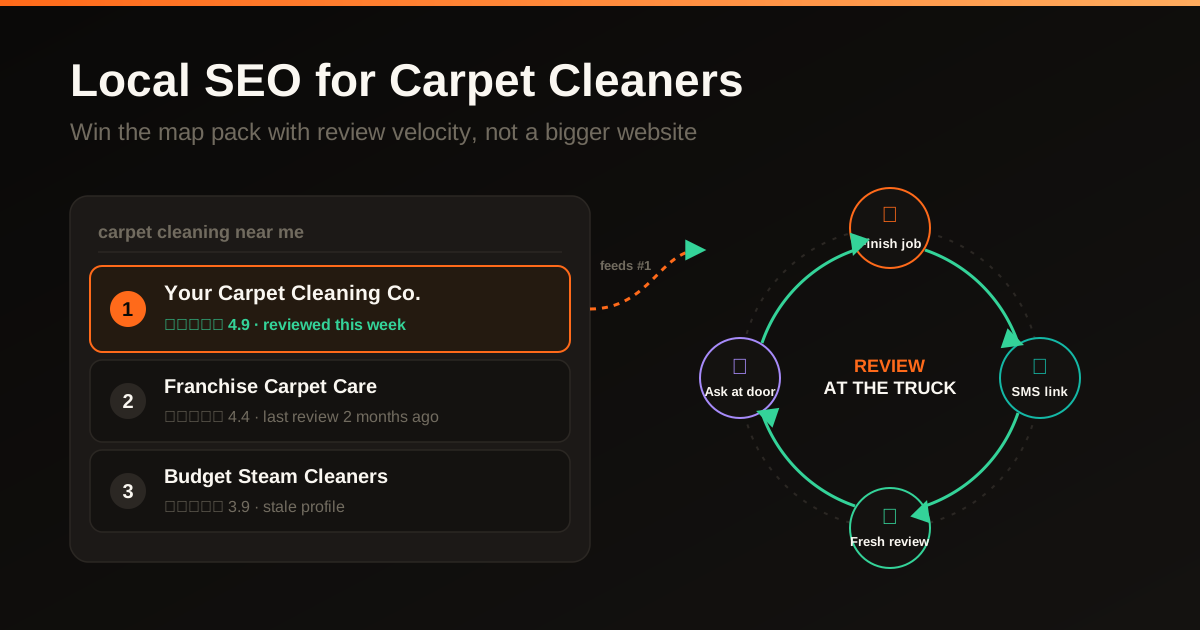
There is a page on the internet that drives more phone calls to your contracting business than your homepage, your Facebook page, and your Yelp listing combined. You did not build it. You do not host it. And if you are like most contractors, you have barely touched it since the day you claimed it. It is your Google Business Profile.
When a homeowner searches 'deck builder near me' or 'roofer in Dallas,' Google does not send them to your website first. It shows them a map with three businesses pinned on it. Those three listings are pulled directly from Google Business Profiles. The homeowner sees your business name, star rating, number of reviews, photos, hours, and a click-to-call button. Most of them never scroll past this map. They pick one of the three, tap call, and hire whoever answers the phone. If your profile is incomplete, outdated, or worse than your competitors, you are invisible to the people who are ready to hire right now.
- Specific primary category plus every relevant secondary
- 20+ real project photos, refreshed every single week
- Reviews answered, Q&A seeded, posts published
- Sits in the map pack and gets the call
- Vague category like 'Contractor' or 'Construction'
- A logo, a stock photo, nothing posted since 2023
- Reviews ignored, Q&A blank, zero posts
- Invisible to homeowners ready to hire right now
Why your Google Business Profile matters more than your website
A Business Profile and website can both support customer discovery and contact. Review the actual account’s interactions and qualified inquiries before deciding which has greater value. Historic profile-completeness statistics are not a forecast for this contractor.
Keep the profile’s services, hours, coverage and contact information accurate. Use genuine photos and a reliable inquiry path. These are useful customer-facing improvements, not promised percentage increases in visits or calls.
Think about the last time you searched for a restaurant in a city you were visiting. You saw the map pack, looked at star ratings, checked the photos, maybe read a review or two, and tapped 'directions' or 'call.' You never visited the restaurant's website. Your customers do the exact same thing when their roof is leaking or they want a new deck. The Google Business Profile is where the decision happens. Everything else is supporting material.
There are three things the profile controls: whether you show up in the map pack (visibility), whether the homeowner clicks your listing instead of a competitor's (click-through), and whether they pick up the phone after viewing your profile (conversion). Each section of the profile influences one or more of these. That is why optimizing it section by section is so valuable: each improvement stacks on the others.
The three factors Google uses to rank map pack results
Google has publicly stated that local search rankings are based on three factors: relevance, distance, and prominence. Understanding these three is the foundation of everything that follows.
Relevance, distance and prominence are broad factors Google identifies for local results. Their exact weights are not public. Adding service areas or geotagged photos does not create a new physical presence or guarantee wider visibility.
- Relevance is how well your profile matches what someone searched for. This is driven by your business categories, your description, your services, and the keywords that appear in your reviews. A roofer whose profile lists 'Roofing Contractor' as the primary category and has dozens of reviews mentioning 'roof replacement' and 'storm damage repair' is more relevant to those searches than a roofer whose profile just says 'Contractor.'
- Distance is how far your business is from the searcher. You cannot control where a customer searches from, but you can influence this by having a verified address in the area you serve and by building city-specific content on your website that signals your service area.
- Prominence is how well-known and trusted your business appears to Google. This is driven by review count and velocity, review ratings, the age and completeness of your profile, citations across the web, backlinks to your website, and how actively you use the profile (posts, photo uploads, Q&A responses). Prominence is where the real optimization happens because you can directly influence all of these signals.
Step one: nail the fundamentals
Business name
Use your real business name exactly as it appears on your signage, business cards, and legal filings. Do not stuff keywords into your business name. 'Premier Deck Builders' is fine. 'Premier Deck Builders - Best Deck Builder in Dallas TX - Deck Installation & Repair' will get your listing suspended. Google actively polices keyword-stuffed business names and competitors report them. Use your actual name and let the rest of the profile handle the keywords.
Address and service area
If customers come to your physical location, list your full address. If you go to customer locations (which most contractors do), you have two options: show your address and set a service area, or hide your address and set only the service area. For most contractors who work out of a home office or a shop that customers never visit, hiding the address and listing your service area cities is the right call. It prevents confusing customers who might try to visit and avoids reviews mentioning that your 'office' is a house.
Set your service area to the specific cities and counties you actually serve. Do not set a 100-mile radius hoping to show up everywhere. Google knows your real service area based on where your reviews come from, where customers request directions to, and where your website content mentions. A tight, accurate service area aligned with your actual customer base performs better than an inflated one.
Phone number and website
Use a local phone number, not a toll-free 800 number. Local numbers signal to both Google and customers that you are actually based in the area. If you use a call tracking number for marketing attribution, set it as the primary number on the profile but make sure your real local number is listed as a secondary number. The real number needs to match your other citations across the web.
Your website URL should go to your homepage or, even better, to a dedicated landing page for your primary service. If you are a deck builder in Dallas, linking to sfwebtech.com/services/deck-building-dallas is more relevant than linking to a generic homepage. The landing page should mirror the information on your profile: same business name, same phone number, same address, same services.
Your website and your Google Business Profile need to tell the same story. We build contractor websites specifically designed to reinforce the signals that drive map pack rankings.
See how a contractor website should support your GBPStep two: categories are everything
Your primary category is the single most important field in your entire Google Business Profile. It tells Google what you are, and it directly determines which searches your profile appears in. Choose the most specific category that describes your primary service. If you build decks, your primary category should be 'Deck Builder,' not 'General Contractor' or 'Home Improvement.' If you do roofing, it should be 'Roofing Contractor,' not 'Construction Company.' Specificity wins.
- 'Deck Builder', 'Roofing Contractor', 'Pool Builder'
- Matches the exact search a homeowner runs
- Puts you in the running for your best-fit jobs
- 'Contractor', 'Construction Company', 'Home Improvement'
- Forces you to compete against every trade at once
- Buries you for the searches that actually convert
After setting the primary category, add every secondary category that legitimately applies. Google allows up to 10 categories total. A deck builder might add 'Fence Contractor,' 'Patio Enclosure Supplier,' 'Pergola Builder,' and 'Porch Builder.' A roofer might add 'Gutter Cleaning Service,' 'Siding Contractor,' and 'Skylight Installer.' Each secondary category expands the searches you can appear in. But only add categories for services you actually provide. Adding unrelated categories dilutes your relevance for the ones that matter.
Step three: write a description that sells and ranks
Write a clear description of the actual business within the limits shown in the current profile editor. Avoid keyword stuffing or claims that engagement with the description has a known indirect ranking effect.
Write the description in first person. Lead with what you do, where you do it, and how long you have been doing it. Work in your primary keywords naturally: the trade, the city, and the types of jobs you do. Then differentiate: what makes you different from the other fifteen contractors in your market? Licensed, insured, years in business, number of completed projects, specific certifications, warranty details. End with a clear call to action.
Here is an example for a deck builder: 'We build custom composite and wood decks across Dallas-Fort Worth. Since 2014, we have completed over 600 deck projects, from backyard entertaining spaces to multi-level wraparound decks. We are licensed, insured, and every build comes with a 5-year workmanship warranty. We handle everything from design to permits to final inspection. Call us for a free on-site estimate and we will show you exactly what your new deck will look like before we break ground.' That is 423 characters, clear, keyword-rich, and it gives the homeowner a reason to call.
Step four: photos that build trust and drive action
Use genuine project photos with permission and enough context to understand the work. They can help customers evaluate fit, but a historic image-engagement statistic does not establish a likely improvement for this profile.
Upload at least 20 to 30 photos to start. Cover the full range so a homeowner sees real proof of your work, not a logo and a stock photo of a hammer:
Add useful new photos as real work becomes available. Google does not identify GPS metadata as a required ranking tactic or a way to verify every job location. Avoid exposing private customer locations unnecessarily.
Step five: Google Posts keep your profile alive
Google Posts are short updates that appear directly on your Business Profile. They show up when someone views your listing and they signal to Google that the business is actively managed. Most contractors have never published a single post. This is free real estate that your competitors are ignoring.
Post once a week at minimum. The content does not need to be elaborate. A completed project photo with a two-sentence description. A seasonal tip relevant to your trade ('Storm season is here. Here are three signs you need a roof inspection'). A service highlight ('We now offer same-day emergency deck repair for safety hazards'). An offer or promotion ('Free gutter inspection with any roof repair booked this month'). Each post stays visible for seven days, so weekly posting keeps one active at all times.
Include a call to action in every post: 'Call now,' 'Book online,' 'Learn more.' Google gives you a CTA button on each post. Use it. And include a relevant keyword naturally in the post text. A deck builder posting about a completed project might write: 'Just finished this 400-square-foot composite deck in Frisco. The homeowner wanted a low-maintenance entertaining space with built-in lighting and integrated planter boxes. Composite decking means no staining, no splinters, and no annual maintenance. Call us for a free deck estimate.' That post includes 'composite deck,' 'Frisco,' 'deck estimate,' and shows real work. Perfect.
Step six: services and products catalog
Google Business Profile has a services section and a products section, and both are underused by contractors. The services section lets you list every service you offer with a description and optional pricing. Each service is an additional keyword signal to Google about what you do.
List every service individually. Do not lump them. A deck builder should list: custom deck design, composite decking installation, wood deck building, deck repair, deck staining and refinishing, pergola construction, railing installation, deck lighting, under-deck drainage systems, and permit management. Each one is a search someone might run. Each one tells Google that your business is relevant to that query.
Describe services accurately using the current editor’s supported fields and limits. Publish prices only when current and properly scoped. A generic price range or a fixed description length is not required for visibility.
Step seven: reviews are the ranking fuel
We wrote an entire separate guide on building a review engine, so we will not repeat all of that here. But it is impossible to talk about GBP optimization without emphasizing that reviews are probably the single biggest factor in map pack rankings after your primary category. Volume, velocity, rating, recency, and the keywords customers use in their reviews all matter.
The GBP-specific angle is this: the keywords in your reviews function as additional relevance signals. When a customer writes 'Premier Deck Builders did an amazing composite deck in our backyard in Plano,' Google reads 'composite deck' and 'Plano' as relevance signals for those queries. You cannot ask customers to include specific keywords (that violates Google's guidelines), but you can prompt them naturally. 'If you have a minute, could you mention the type of project we did for you? It helps other homeowners find the right contractor.' Most customers will naturally include the type of work and their city.
Reviews fuel your GBP rankings. We built a 4-step system for generating consistent 5-star reviews without buying, gating, or incentivizing. Step-by-step, including text templates and automation triggers.
Read the complete review engine playbookStep eight: Q&A is an SEO opportunity hiding in plain sight
The Q&A section on your Google Business Profile is public and anyone can ask a question or post an answer. Most contractors never look at this section. Meanwhile, random people (sometimes competitors) post questions that sit unanswered for months, making the business look unresponsive.
Take control of your Q&A section by seeding it yourself. You can ask and answer your own questions. This is not against Google's guidelines and it is one of the most underused optimization tactics. Post the 10 to 15 questions your customers ask most frequently: 'Do you offer free estimates?' 'Are you licensed and insured?' 'How long does a deck build take?' 'Do you handle permits?' 'What areas do you serve?' Then answer each one thoroughly, naturally including keywords.
These Q&A entries show up prominently on your profile, they signal relevance to Google for the terms used, and they pre-answer objections that might prevent a homeowner from calling. A prospect who reads 'Yes, we are fully licensed and insured, and we handle all permits with the city' does not need to ask, they just call.
Step nine: attributes and amenities
Google offers a growing list of business attributes that appear as badges on your profile. For contractors, the most relevant ones include: veteran-owned, women-owned, family-owned, LGBTQ-friendly, free estimates, online appointments, and various certification badges. Check your profile regularly because Google adds new attributes and some are auto-suggested based on customer feedback.
These attributes serve two purposes. They act as trust signals for prospective customers (a 'veteran-owned' badge resonates strongly in many markets), and they function as filter criteria in Google's search. When someone searches 'veteran-owned contractor near me,' only businesses with that attribute checked will appear prominently. Free, easy, and most contractors never set them.
The weekly GBP maintenance routine
Optimizing your profile once and walking away is better than nothing but it leaves most of the value on the table. The contractors who consistently rank in the map pack treat their profile like a living marketing channel. Here is a weekly routine that takes about 30 minutes and keeps your profile performing.
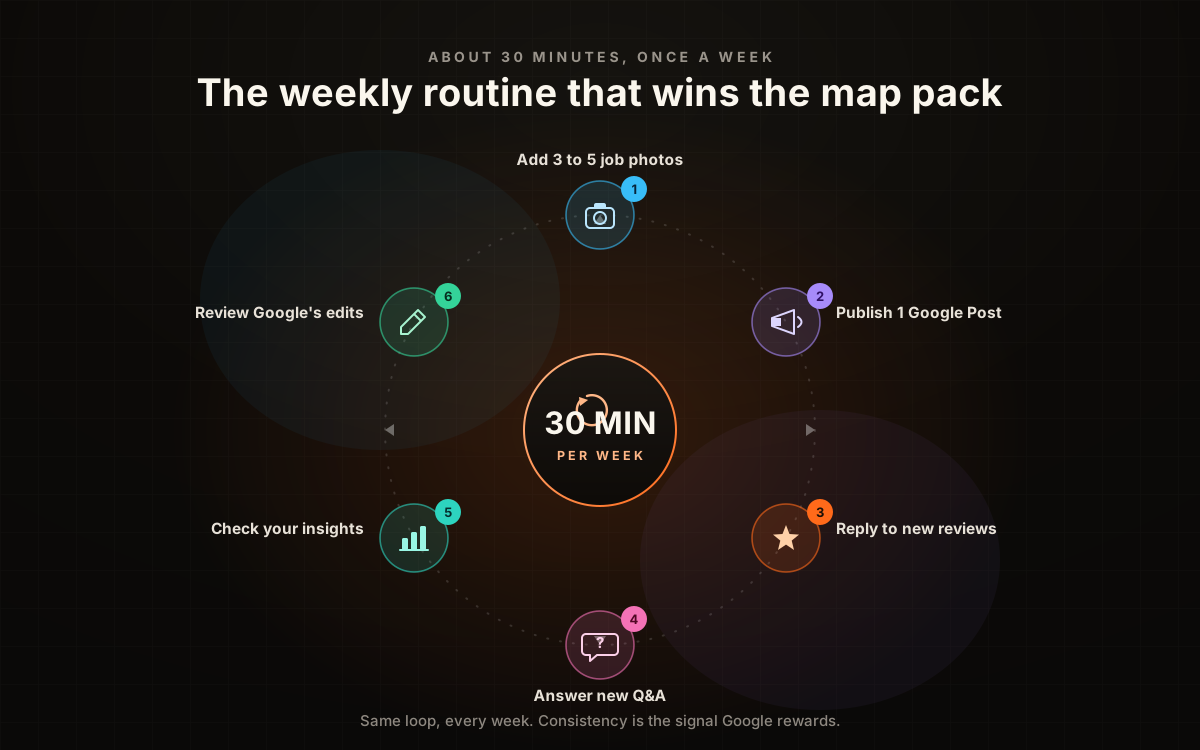
Review current services, hours, contact details and suggested edits. Add relevant work updates when useful, respond to customer feedback professionally and inspect available performance data. Use only profile features currently supported in the account; do not rely on a historic Q&A-seeding or messaging workflow.
Common GBP mistakes that cost contractors jobs
Check inaccurate categories, misleading business names, outdated contact details and incorrect hours. Use the real-world business name under Google’s guidelines. Add useful genuine service information and photos without claiming that every formatting difference, missing post or unanswered review creates a known ranking penalty.
How GBP optimization fits into the bigger local SEO picture
Your Google Business Profile does not exist in isolation. It is one piece of a local SEO system that includes your website, your citations (directory listings), your reviews, your backlinks, and your content. The strongest map pack positions go to businesses that have all of these pieces aligned and reinforcing each other.
Your website should have a dedicated page for each service listed on your GBP, with matching keywords and NAP information. Your directory listings across Yelp, Angi, BBB, and industry-specific sites should have identical business information. Your review profile should be active and growing. And your content, blog posts, city pages, and guides, should target the same keywords that your GBP categories and services are optimized for. When all of these signals point in the same direction, Google has no doubt about who you are, what you do, and where you do it. That clarity is what earns the map pack.
GBP optimization is one pillar of our contractor SEO program. We combine profile optimization, review velocity, technical SEO, city pages, and content strategy into a single system. See how the pieces connect.
See the full contractor SEO systemWhen to hire a pro vs. doing it yourself
Everything in this guide, you can do yourself. The profile optimization, the photo uploads, the posts, the review responses. If you have 30 minutes a week and the discipline to do it consistently, you do not need an agency. Most contractors who follow this guide will see measurable improvement in their map pack visibility within 60 to 90 days.
- You have 30 focused minutes free every week
- You will actually keep the photo and post cadence going
- You only need the profile itself dialed in
- You want the website, city pages, and citations all reinforcing the profile
- You want rank tracking across every zip code you serve
- You would rather book jobs than manage another marketing channel
Professional support can coordinate the website, profile, useful content and reporting. Assess its value against the agreed scope and actual qualified inquiries. It does not automatically pay for itself or guarantee coverage in every ZIP code.
In 30 minutes, we will pull up your Google Business Profile live, show you exactly what is optimized and what is missing, compare you against the top three competitors in your map pack, and map out a 90-day optimization plan. No cost, no obligation.
Book a free GBP audit callFrequently asked questions
How long does it take for GBP changes to show up in rankings?
Category and description changes can take 2 to 4 weeks to fully reflect in rankings. Photo uploads and posts are indexed within hours but their ranking impact accumulates over weeks of consistent activity. Review velocity improvements show ranking impact within 30 to 60 days. The biggest mistake is optimizing once and checking rankings the next day. GBP optimization is a compound game, the results build over weeks and months.
Can I have multiple Google Business Profiles for the same business?
Only if you have multiple physical locations that customers visit. You cannot create separate profiles for different service areas or different services at the same location. Google will detect and merge or suspend duplicate listings. If you serve Dallas and Fort Worth from one location, you get one profile with both cities in your service area, not two profiles.
Should I use a PO box or virtual office for my GBP address?
No. Google explicitly prohibits PO boxes and most virtual office addresses. If you work out of your home and do not want to show your home address, set your profile to service-area-only (hide the address) and list the cities you serve. This is the standard setup for most contractors and it works perfectly well for map pack rankings.
Do Google Posts actually help rankings?
Google does not confirm a direct local-ranking benefit from a weekly post schedule. Use posts for accurate customer communication and review their available engagement data. Do not label an assumed activity mechanism or an undocumented client correlation as a proven ranking factor.
The bottom line
Your Google Business Profile is the front door of your business for local customers. It is where they find you, evaluate you, and decide to call you. Most contractors treat it as a set-it-and-forget-it listing. The ones who dominate the map pack treat it as a living, breathing marketing channel that gets attention every single week.
The playbook is not complicated. Get your categories right. Write a real description. Upload photos from every job. Post every week. Respond to every review. List every service. Seed your Q&A. Check your attributes. Do those eight things consistently for 90 days and you will outperform the vast majority of contractors in your market who are doing zero of them.
If you want us to handle the entire process, from the initial profile audit to the weekly maintenance to the surrounding local SEO system that makes everything work harder, that is exactly what we do. Book a discovery call and we will show you exactly where you stand today and how far we can move the needle.
30 minutes. Full GBP audit, competitive analysis, and a 90-day roadmap for your Google Business Profile and local SEO. No pressure, no obligation.
Book a free discovery callSources and further reading
- Google Search: SEO Starter Guide
Crawlable links, descriptive page information and content organization. Practical trade examples are SF Web Tech recommendations.
Source checked .
- Google Business Profile: local ranking guidance
Google’s broad relevance, distance and prominence guidance. No exact ranking weights or guaranteed service-area coverage are stated.
Source checked .
- Google Maps: prohibited and restricted content
Rules against fake engagement, incentives and selectively soliciting positive reviews.
Source checked .